

We’ve all heard digital music, haven’t we? And that means you’ve probably heard of “Bitrate” or came across files that ended up with “kbps”. The thing is … what does that mean? What the heck is bitrate? We are here to help.
In the simplest case, the bit rate is an expression of the amount of data that a file generates per second.
For example, you might see something like “320 kbps”. This literally means 320 kilobits per second, which is how much data is being produced. To make things easier, we’ve put this into a handy picture for you:
That, friends, is bitrate.
How does the bit rate affect the music?
This is where things get a little more complicated.
Most likely, the bit rate is attached to lossy files like MP3, OGG Vorbis, or AAC. We’ll go into detail about what lossy and lossless files are here. What is critical, however, is that lossy files are compressed in such a way that certain information is lost. On the other hand, lossless files (like FLAC or WAV) retain all of the audio information.
For this reason, lossless files are described with both sample rate and bit depth, but lossy files are not. But we don’t have to worry about that.
Now the bitrate can be appended to any music file, but as mentioned earlier it is more commonly used for lossy files like MP3s. Using this format as an example, the highest possible bit rate is 320 kilobits per second.
But what if we take a format like the humble CD? This has a bit rate of 1,411 kilobits per second, which is 4.5 times the quality of the highest MP3.
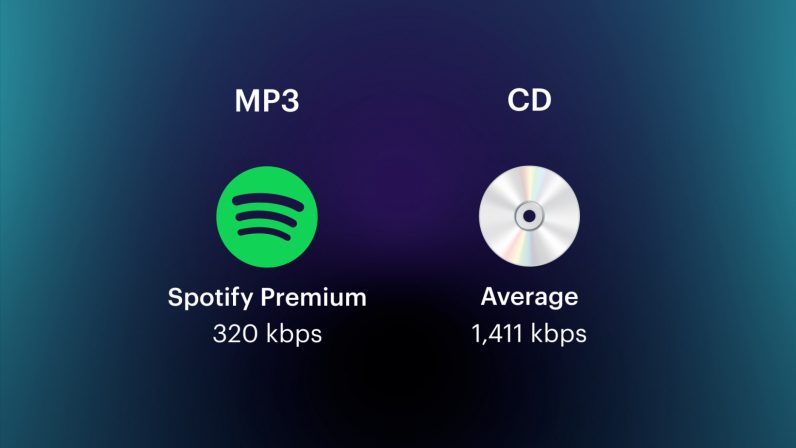 Spotify actually uses OGG Vorbis, but the basic truth about the bitrate remains.
There’s a direct relationship between bitrate and music quality – but it’s a bit more complex.
We mentioned that MP3s are lossy files, which means that they were compressed in such a way that certain bits of audio were lost. However, it does so in a smart way and takes advantage of it psychoacoustic principles such as temporal and simultaneous masking.
What it really means is that while something like an MP3 file has a far lower bitrate than a lossless file, it doesn’t sound like it. For example, using the image above, an MP3 at 320 kbps doesn’t sound 4.5 times worse than a CD track.
This picture sums up the effects of bit rate on recorded music well:
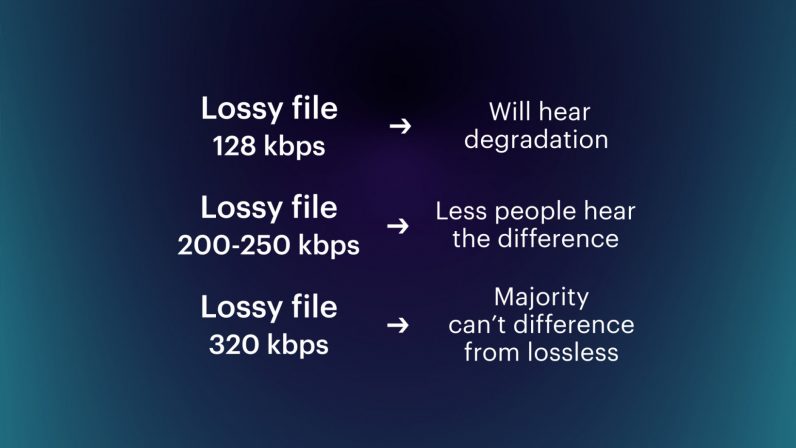
At 128 kbps, you’ll hear trebly registers (like hi-hats) that sound a bit thin. But the higher the bit rate of the lossy file, the less difference you will hear from an uncompressed one.
If you want to read and explore all of this a little more, go here.
Let’s wrap it all up before we go. Bit rate is an expression of how much data an audio file generates per second. And the higher the bit rate, the higher the music quality – up to a point.
Have fun hunting out there folks!
Did you know we have a consumer tech newsletter? It’s called Plugged In – and you can subscribe to it here.
Published on March 15, 2021 – 09:31 UTC

Comments are closed.